Profile Themes Guide
Your profile is your public face on AICHIKI, and profile themes let you style it your way. A theme changes the look of your whole profile: the header banner behind your avatar, the colors, the fonts, and the frame around your profile picture. Pick one that matches your vibe and make your profile feel like yours.
How do I open the theme selector?
On mobile: open the sidebar and tap Profile, then tap the Theme button (the palette icon) in the row of buttons below your bio.
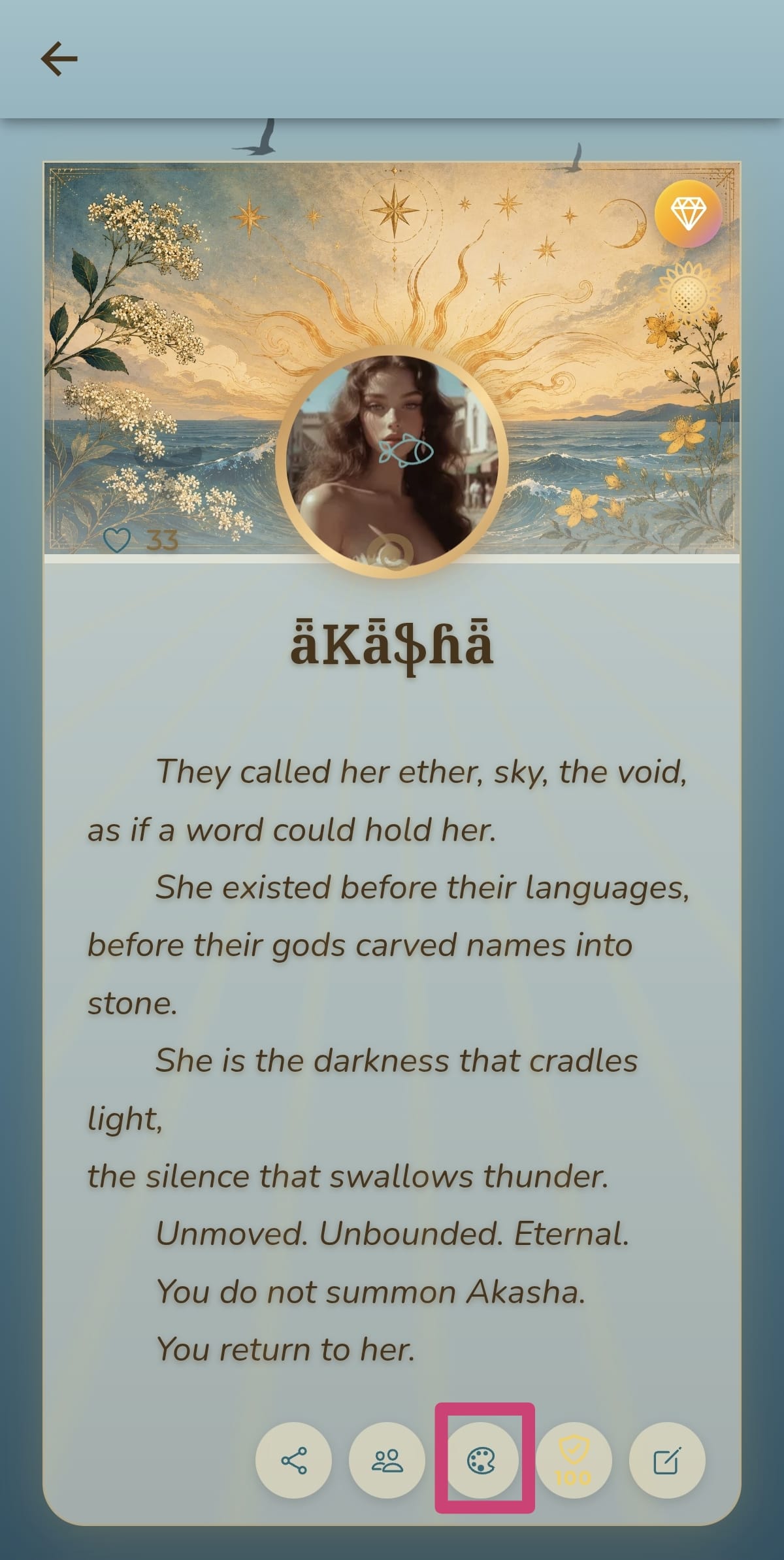
On web: click your profile picture in the top corner to go to your profile, then tap the Theme button (the palette icon).
The selector opens to a grid of every theme. It scrolls automatically to your current theme, which is marked with a purple border and a purple checkmark.
How do I apply a theme?
- Tap any theme in the grid to select it. The preview at the top updates instantly so you can see how it looks.
- Tap SAVE in the top corner.
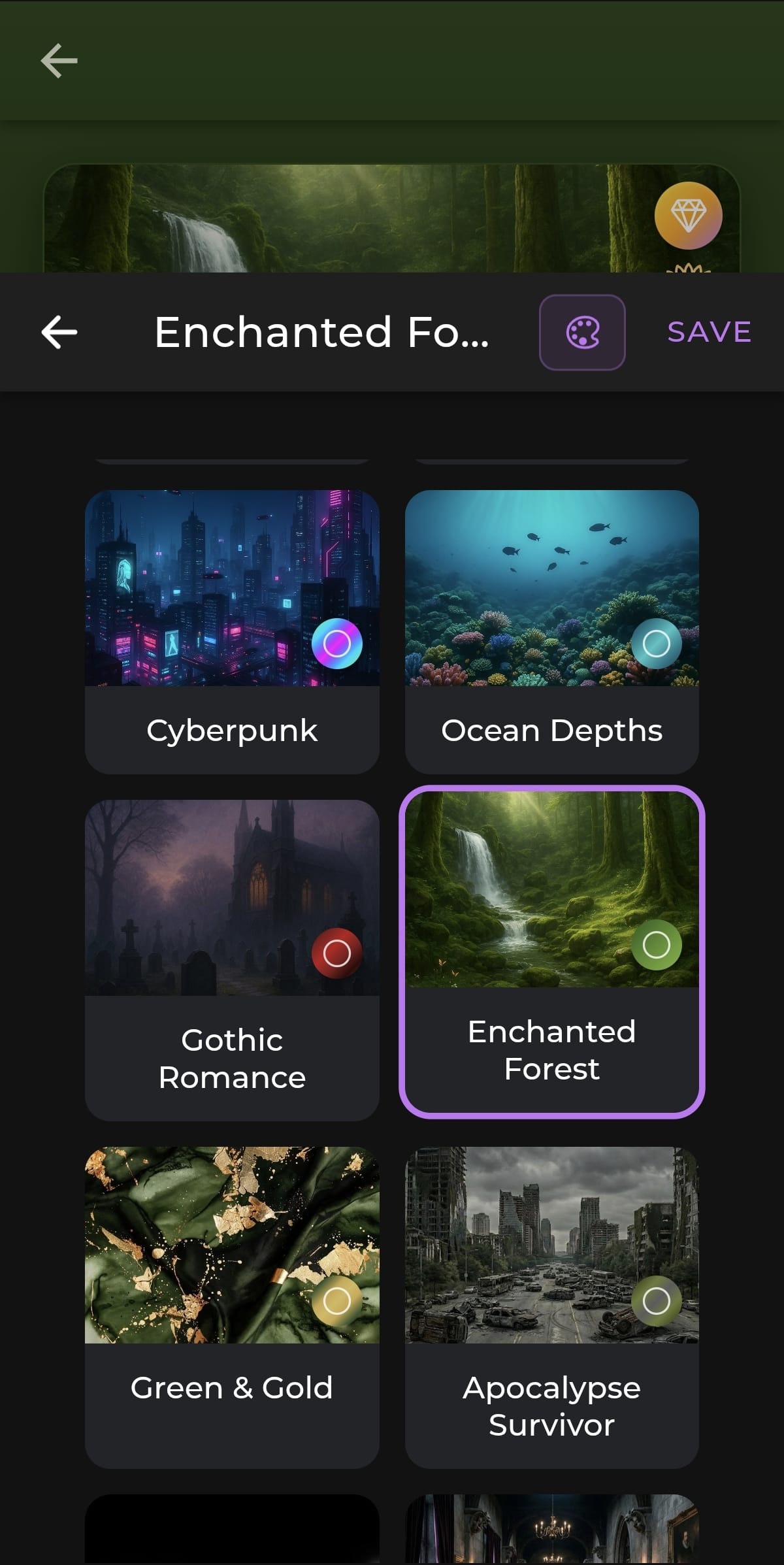
That's it. The theme applies with its default settings right away. If you want to fine-tune it first, use the customizer described below before you save.
TIP
The small colored circle on each theme thumbnail is a quick preview of that theme's color palette, so you can see its main colors at a glance before selecting it.
How do I customize my theme?
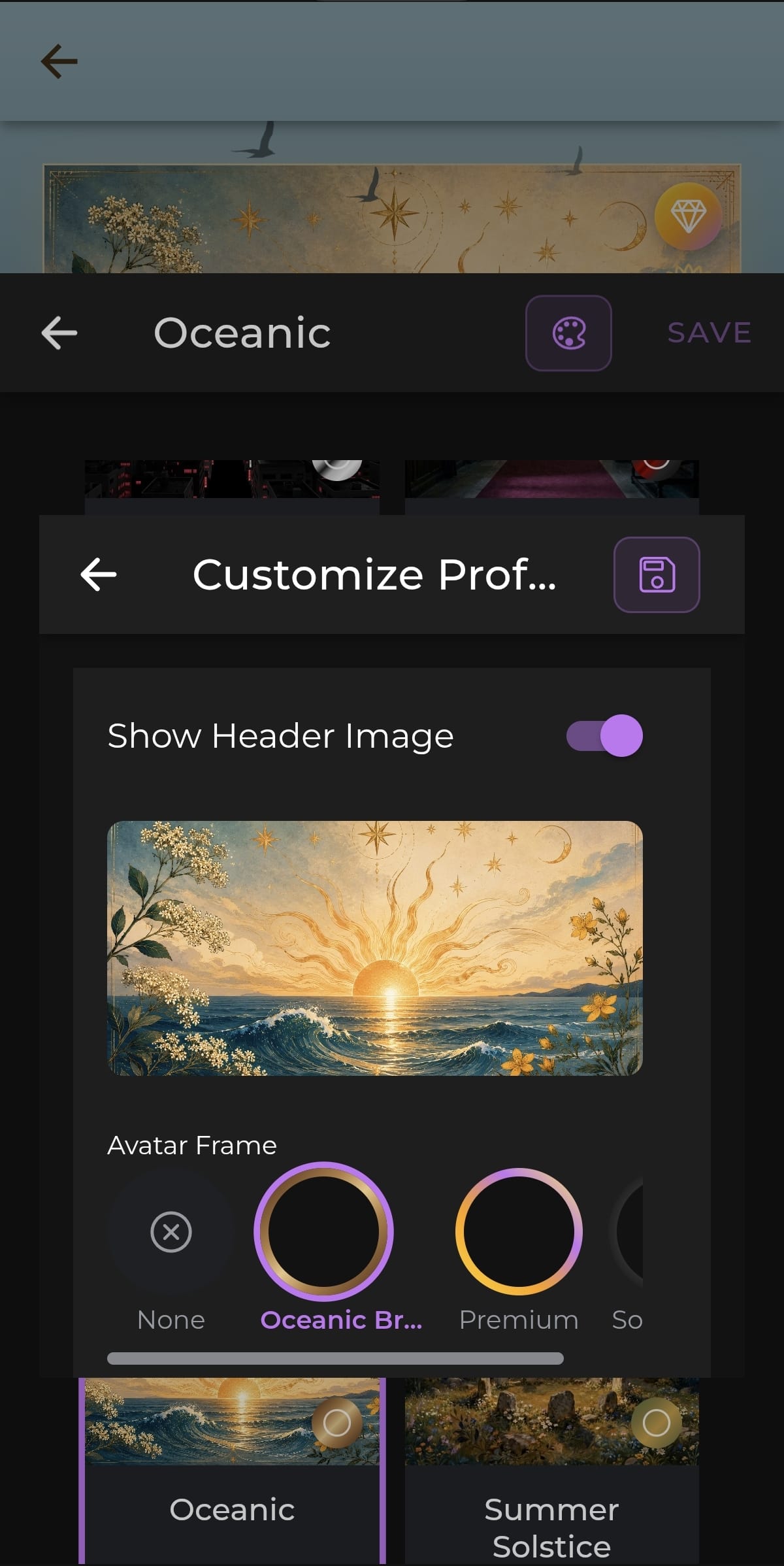
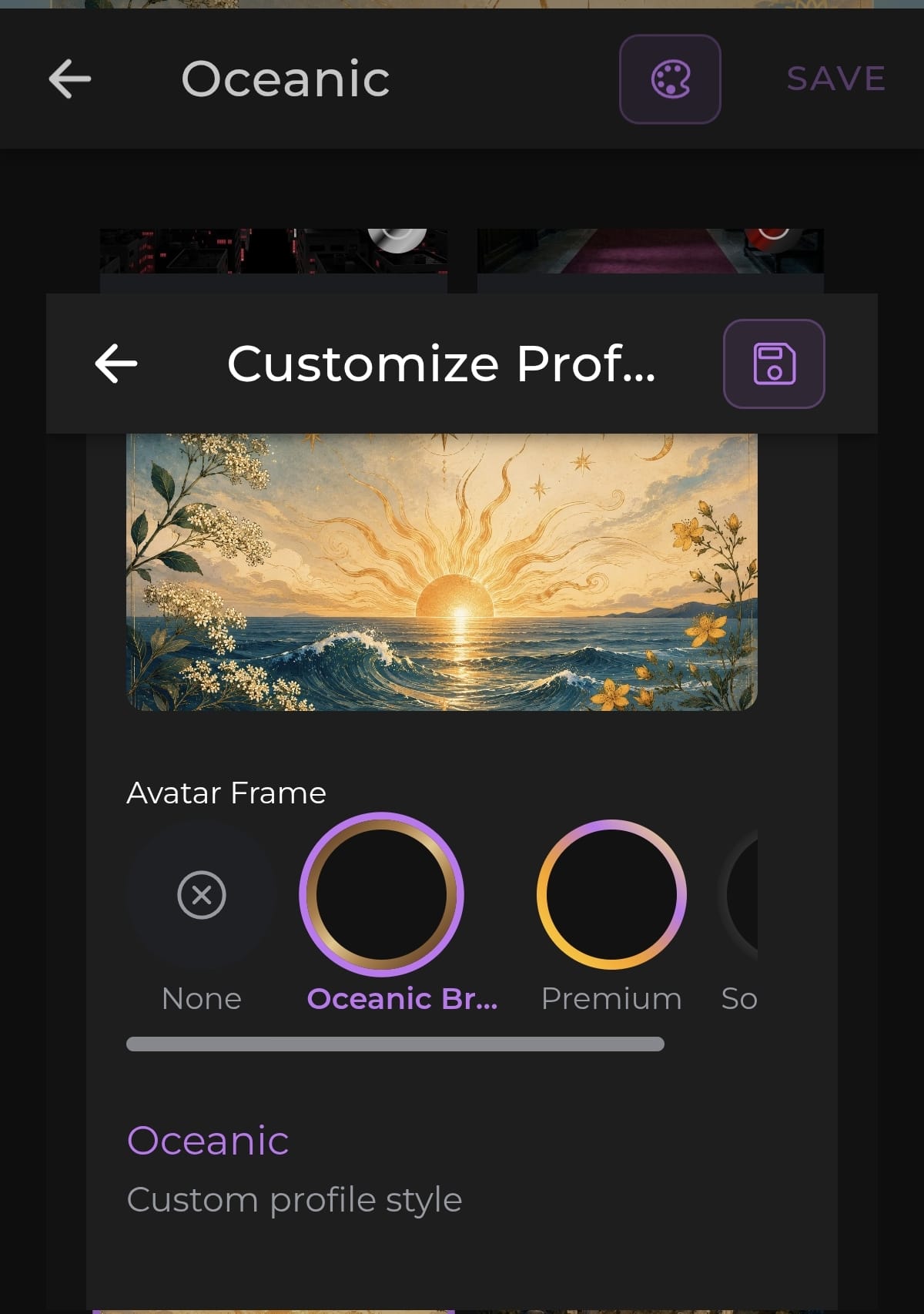
Once you have a theme selected, tap the palette icon at the top of the selector to open the Customize Profile Theme panel. Here you can adjust two things:
Show Header Image — toggle the theme's banner image on or off. With it on, your chosen theme's artwork sits behind your avatar. With it off, your profile card uses a clean, simple background instead while keeping the theme's colors and fonts.
Avatar Frame — choose the ring around your profile picture. Each theme includes a few options, such as a glowing ring, a soft fade, or none at all. Tap the one you want; the selected frame is marked with a purple ring.
When you're happy, tap the save icon in the customizer to apply everything.
TIP
You don't have to customize anything. Selecting a theme and tapping SAVE gives you the full default look in one step. The customizer is there for when you want to tweak it.
Available Themes
Free Themes
These themes are available to all users:
🌃 Mafia Noir — Dark city skylines and crime-drama atmosphere.
🌅 Golden Sunset — Warm orange and gold tones for a peaceful, romantic feel.
🌍 Earth — Grounded, natural tones with an organic feel.
🌸 Sakura Blossom — Soft pink cherry blossom aesthetics with an elegant Japanese-inspired design.
🎮 Cyberpunk — Neon glows and high-tech city aesthetics.
🌊 Ocean Depths — Calming blue gradients and underwater vibes.
🖤 Gothic Romance — Dark, elegant Victorian aesthetics for dramatic profiles.
🌲 Enchanted Forest — Lush green nature with a mystical, magical feel.
🌿 Green & Gold — Rich green watercolor tones with golden accents.
☠️ Apocalypse Survivor — Gritty, weathered post-apocalyptic atmosphere.
🌸 Cherry Blossoms — Sunlit blossoms and soft spring scenery.
👼 Internet Angel — Dreamy pink, soft and ethereal with an angelic glow.
✨ Classic — The default AICHIKI look. Clean and minimal.
Premium Themes
These themes are visible to everyone but require an active Plus or Premium subscription to use. They're marked with a gold lock in the selector. You can also unlock them with a referral code (which gives you 5 days of Plus) or by starting the 3-day Premium trial.
🌙 Celestial — Soft, heavenly tones with a serene, cosmic elegance.
🦇 Vampire Court — Opulent gothic halls with a dark, regal atmosphere.
🪆 Haunted Dolls — Eerie, vintage doll aesthetics for the wonderfully creepy.
🌊 Oceanic — Sunlit ocean waves with drifting clouds, soaring birds, and elegant gold botanical accents. Fully animated for a serene, immersive escape.
Challenge Exclusive Themes
These themes can't be bought or subscribed to. They're awarded as rewards for winning AICHIKI community challenges, which makes them a rare mark of the people who earned them.
☀️ Summer Solstice — A golden midsummer night of moonlight, wildflowers, and standing stones. Awarded to the winner of the Summer Solstice Character Creation Challenge.
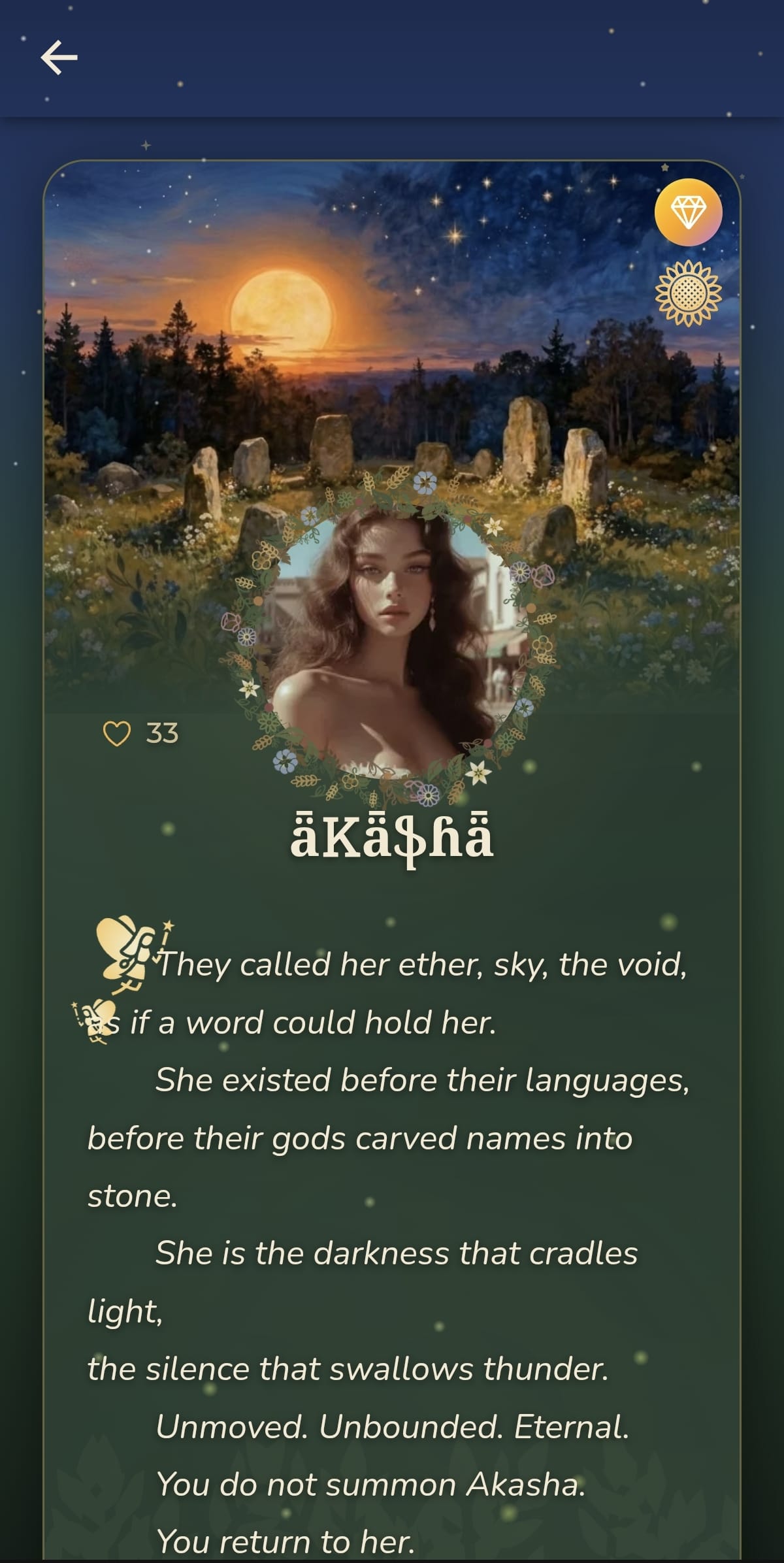
INFO
Challenge Exclusive themes stay locked even if you subscribe to Plus or Premium. The only way to get one is to win the challenge it belongs to. Keep an eye on our community channels for future challenges and the themes you can earn from them.
Themes by Plan
| Theme Type | Free Users | Plus Users | Premium Users |
|---|---|---|---|
| Free Themes | ✅ Yes | ✅ Yes | ✅ Yes |
| Premium Themes | ❌ Locked | ✅ Yes | ✅ Yes |
| Customization (header, frame) | ✅ Yes | ✅ Yes | ✅ Yes |
| Challenge Exclusive Themes | 🏆 Win the challenge | 🏆 Win the challenge | 🏆 Win the challenge |
Frequently Asked Questions
Q: Do profile themes change my chat themes? A: No. Profile themes style your public profile, and chat themes style individual conversations. They're set separately. See the Chat Themes Guide for styling your chats.
Q: I subscribed to Premium, so why is Summer Solstice still locked? A: Summer Solstice is a Challenge Exclusive theme, not a Premium one. It's awarded only to the winner of its challenge and can't be unlocked by subscribing. Premium does unlock the four Premium themes (Celestial, Vampire Court, Haunted Dolls, and Oceanic).
Q: What happens to my Premium theme if my subscription ends? A: If your subscription or trial ends, locked themes return to being locked. Your profile falls back to a default look until you choose a theme that's available on your current plan.
Q: Can I change my theme as often as I like? A: Yes. Open the selector, pick a different theme, and save. You can switch as often as you want.
Q: How do I remove a theme? A: Select the Classic theme for the clean, default AICHIKI look.
Q: Will other people see my theme? A: Yes. Your profile theme is part of your public profile, so anyone who visits your profile sees it the way you've styled it.
Still Need Help?
If you have questions about profile themes or run into any trouble, contact our support team and we'll be glad to help.